
手動作成したリソースをTerraformでインポートしてみた

目次
はじめに
こんにちは、CloudBuildersのsugawaraです。
前回は手動構築したリソースをインポートしてCDK(CloudFormation)管理下に置き、cdk-nagでセキュリティチェックまで実施しました。今回はインポートして設定を更新するまでの流れを、Terraformを使ってやっていきます。
なお、Terraformについては、以前Terraform Associate (002)という資格を取得していますが、実案件では利用していませんでした。今後はTerraformも使えるようになるため、8月はTerraform再入門月間として、学び直しています。
前提
今回利用するimportブロックはTerraform v1.5で導入された機能のため、それ以降のバージョンを利用します。Terraformのバージョン管理はtenvです。
$ terraform --version
Terraform v1.12.1
on linux_amd64

$ tenv --version
tenv version v4.7.6
※以前はtfenvを使っていましたが、数年前から更新が止まっているようなので、tenvに乗り換えました。
手順
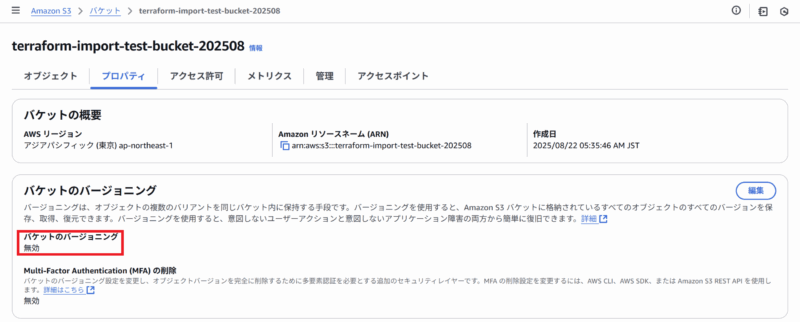
コンソール画面上で、予め東京リージョンにterraform-import-test-bucket-202508というS3バケットを作成しておきます。後ほどTerraformを使って設定を更新するため、バージョニングは無効にしておきます。
今回の作業用ディレクトリを作成して移動します。
$ mkdir terraform-import && cd terraform-importいくつかファイルを作成します。まずprovider.tfにはプロバイダとそのバージョンを指定します。
terraform {
  required_providers {
    aws = {
      source  = "hashicorp/aws"
      version = "~> 6.0"
    }
  }
}

provider "aws" {
  region = "ap-northeast-1"
}
次に、import.tfで今回インポートするS3バケット名を下記のように指定します。
import {
  to = aws_s3_bucket.test
  id = "terraform-import-test-bucket-202508" # バケット名がID
}
初期化コマンドを実行します。これでterraform planなどのコマンドが実行できるようになります。
$ terraform init
Initializing the backend...
Initializing provider plugins...
- Finding hashicorp/aws versions matching "~> 6.0"...
- Installing hashicorp/aws v6.9.0...
- Installed hashicorp/aws v6.9.0 (signed by HashiCorp)
Terraform has created a lock file .terraform.lock.hcl to record the provider
selections it made above. Include this file in your version control repository
so that Terraform can guarantee to make the same selections by default when
you run "terraform init" in the future.

Terraform has been successfully initialized!

You may now begin working with Terraform. Try running "terraform plan" to see
any changes that are required for your infrastructure. All Terraform commands
should now work.

If you ever set or change modules or backend configuration for Terraform,
rerun this command to reinitialize your working directory. If you forget, other
commands will detect it and remind you to do so if necessary.
次に、import ブロックで取り込みたい既存リソースから、最小限のHCLコードを自動生成して ファイルに書き出します。planコマンドに、-generate-config-out=ファイル名というオプションで実行します。
$ terraform plan -generate-config-out=generated.tf
aws_s3_bucket.test: Preparing import... [id=terraform-import-test-bucket-202508]
aws_s3_bucket.test: Refreshing state... [id=terraform-import-test-bucket-202508]

Terraform will perform the following actions:

  # aws_s3_bucket.test will be imported
  # (config will be generated)
    resource "aws_s3_bucket" "test" {
        acceleration_status         = null
        arn                         = "arn:aws:s3:::terraform-import-test-bucket-202508"
        bucket                      = "terraform-import-test-bucket-202508"
        bucket_domain_name          = "terraform-import-test-bucket-202508.s3.amazonaws.com"
        bucket_prefix               = null
        bucket_region               = "ap-northeast-1"
        bucket_regional_domain_name = "terraform-import-test-bucket-202508.s3.ap-northeast-1.amazonaws.com"
        force_destroy               = false
        hosted_zone_id              = "Z2M4EHUR26P7ZW"
        id                          = "terraform-import-test-bucket-202508"
        object_lock_enabled         = false
        policy                      = null
        region                      = "ap-northeast-1"
        request_payer               = "BucketOwner"
        tags                        = {}
        tags_all                    = {}

        grant {
            id          = "6e19b281a4942b0adaccd777cb4799f61c7cb87f82c11e8870fc05c196f8747c"
            permissions = [
                "FULL_CONTROL",
            ]
            type        = "CanonicalUser"
            uri         = null
        }

        server_side_encryption_configuration {
            rule {
                bucket_key_enabled = true

                apply_server_side_encryption_by_default {
                    kms_master_key_id = null
                    sse_algorithm     = "AES256"
                }
            }
        }

        versioning {
            enabled    = false
            mfa_delete = false
        }
    }

Plan: 1 to import, 0 to add, 0 to change, 0 to destroy.
╷
│ Warning: Config generation is experimental
│
│ Generating configuration during import is currently experimental, and the generated configuration
│ format may change in future versions.
╵

────────────────────────────────────────────────────────────────────────────────────────────────────

Terraform has generated configuration and written it to generated.tf. Please review the
configuration and edit it as necessary before adding it to version control.

Note: You didn't use the -out option to save this plan, so Terraform can't guarantee to take exactly
these actions if you run "terraform apply" now.
下記のようなgenerated.tfが生成されます。
# __generated__ by Terraform
# Please review these resources and move them into your main configuration files.

# __generated__ by Terraform from "terraform-import-test-bucket-202508"
resource "aws_s3_bucket" "test" {
  bucket              = "terraform-import-test-bucket-202508"
  bucket_prefix       = null
  force_destroy       = false
  object_lock_enabled = false
  region              = "ap-northeast-1"
  tags                = {}
  tags_all            = {}
}
いくつか不要な箇所があるため、それらを削除してmain.tfにコピペします。下記はわかりやすくするため、そのままコピペして不要な箇所はコメントアウトしています。
resource "aws_s3_bucket" "test" {
  bucket = "terraform-import-test-bucket-202508"
  # bucket_prefix       = null
  force_destroy       = false
  object_lock_enabled = false
  # region              = "ap-northeast-1"
  # tags                = {}
  # tags_all            = {}
}
不要になったgenerated.tfは削除します。もしgenerated.tfが残っている状態でplanコマンドを実行すると、下記のような重複エラーが出ます。main.tfとgenerated.tfでそれぞれ同じバケット名が定義されてしまっているからです。
$ terraform plan
╷
│ Error: Duplicate resource "aws_s3_bucket" configuration
│
│   on main.tf line 1:
│    1: resource "aws_s3_bucket" "test" {
│
│ A aws_s3_bucket resource named "test" was already declared at generated.tf:5,1-32. Resource names
│ must be unique per type in each module.
import.tfとmain.tf、provider.tfがある状態でplanコマンドを実行します。出力に1 to importが表示されます。
$ terraform plan
aws_s3_bucket.test: Preparing import... [id=terraform-import-test-bucket-202508]
aws_s3_bucket.test: Refreshing state... [id=terraform-import-test-bucket-202508]

Terraform will perform the following actions:

  # aws_s3_bucket.test will be imported
    resource "aws_s3_bucket" "test" {
        acceleration_status         = null
        arn                         = "arn:aws:s3:::terraform-import-test-bucket-202508"
        bucket                      = "terraform-import-test-bucket-202508"
        bucket_domain_name          = "terraform-import-test-bucket-202508.s3.amazonaws.com"
        bucket_prefix               = null
        bucket_region               = "ap-northeast-1"
        bucket_regional_domain_name = "terraform-import-test-bucket-202508.s3.ap-northeast-1.amazonaws.com"
        force_destroy               = false
        hosted_zone_id              = "Z2M4EHUR26P7ZW"
        id                          = "terraform-import-test-bucket-202508"
        object_lock_enabled         = false
        policy                      = null
        region                      = "ap-northeast-1"
        request_payer               = "BucketOwner"
        tags                        = {}
        tags_all                    = {}

        grant {
            id          = "6e19b281a4942b0adaccd777cb4799f61c7cb87f82c11e8870fc05c196f8747c"
            permissions = [
                "FULL_CONTROL",
            ]
            type        = "CanonicalUser"
            uri         = null
        }

        server_side_encryption_configuration {
            rule {
                bucket_key_enabled = true

                apply_server_side_encryption_by_default {
                    kms_master_key_id = null
                    sse_algorithm     = "AES256"
                }
            }
        }

        versioning {
            enabled    = false
            mfa_delete = false
        }
    }

Plan: 1 to import, 0 to add, 0 to change, 0 to destroy.

────────────────────────────────────────────────────────────────────────────────────────────────────

Note: You didn't use the -out option to save this plan, so Terraform can't guarantee to take exactly
these actions if you run "terraform apply" now.
plan結果に問題がなければ、applyコマンドを実行します。Apply complete!が表示されればインポート完了です。
$ terraform apply
aws_s3_bucket.test: Preparing import... [id=terraform-import-test-bucket-202508]
aws_s3_bucket.test: Refreshing state... [id=terraform-import-test-bucket-202508]

Terraform will perform the following actions:

  # aws_s3_bucket.test will be imported
    resource "aws_s3_bucket" "test" {
        acceleration_status         = null
        arn                         = "arn:aws:s3:::terraform-import-test-bucket-202508"
        bucket                      = "terraform-import-test-bucket-202508"
        bucket_domain_name          = "terraform-import-test-bucket-202508.s3.amazonaws.com"
        bucket_prefix               = null
        bucket_region               = "ap-northeast-1"
        bucket_regional_domain_name = "terraform-import-test-bucket-202508.s3.ap-northeast-1.amazonaws.com"
        force_destroy               = false
        hosted_zone_id              = "Z2M4EHUR26P7ZW"
        id                          = "terraform-import-test-bucket-202508"
        object_lock_enabled         = false
        policy                      = null
        region                      = "ap-northeast-1"
        request_payer               = "BucketOwner"
        tags                        = {}
        tags_all                    = {}

        grant {
            id          = "6e19b281a4942b0adaccd777cb4799f61c7cb87f82c11e8870fc05c196f8747c"
            permissions = [
                "FULL_CONTROL",
            ]
            type        = "CanonicalUser"
            uri         = null
        }

        server_side_encryption_configuration {
            rule {
                bucket_key_enabled = true

                apply_server_side_encryption_by_default {
                    kms_master_key_id = null
                    sse_algorithm     = "AES256"
                }
            }
        }

        versioning {
            enabled    = false
            mfa_delete = false
        }
    }

Plan: 1 to import, 0 to add, 0 to change, 0 to destroy.

Do you want to perform these actions?
  Terraform will perform the actions described above.
  Only 'yes' will be accepted to approve.

  Enter a value: yes

aws_s3_bucket.test: Importing... [id=terraform-import-test-bucket-202508]
aws_s3_bucket.test: Import complete [id=terraform-import-test-bucket-202508]

Apply complete! Resources: 1 imported, 0 added, 0 changed, 0 destroyed.
実際にTerraformで管理しているかを確認するには、terraform stateコマンドを実行します。下記のように表示されれば、S3バケットがTerraform管理下にあるとわかります。
$ terraform state list
aws_s3_bucket.test
次に、このS3バケットをTerraformを使って設定を更新します。手動作成時に無効化していたバージョニングを有効化してみます。下記のリソースブロックを追加します。
resource "aws_s3_bucket" "test" {
  bucket = "terraform-import-test-bucket-202508"
  # bucket_prefix       = null
  force_destroy       = false
  object_lock_enabled = false
  # region              = "ap-northeast-1"
  # tags                = {}
  # tags_all            = {}
}

### バージョニング設定を追加
resource "aws_s3_bucket_versioning" "test" {
  bucket = aws_s3_bucket.test.id
  versioning_configuration {
    status = "Enabled"
  }
}
planコマンドを実行すると、バージョニング設定が追加される差分が表示されています。
$ terraform plan
aws_s3_bucket.test: Refreshing state... [id=terraform-import-test-bucket-202508]

Terraform used the selected providers to generate the following execution plan. Resource actions are
indicated with the following symbols:
  + create

Terraform will perform the following actions:

  # aws_s3_bucket_versioning.test will be created
  + resource "aws_s3_bucket_versioning" "test" {
      + bucket = "terraform-import-test-bucket-202508"
      + id     = (known after apply)
      + region = "ap-northeast-1"

      + versioning_configuration {
          + mfa_delete = (known after apply)
          + status     = "Enabled"
        }
    }

Plan: 1 to add, 0 to change, 0 to destroy.

────────────────────────────────────────────────────────────────────────────────────────────────────

Note: You didn't use the -out option to save this plan, so Terraform can't guarantee to take exactly
these actions if you run "terraform apply" now.
問題なさそうなので、applyコマンドを実行します。
$ terraform apply
aws_s3_bucket.test: Refreshing state... [id=terraform-import-test-bucket-202508]

Terraform used the selected providers to generate the following execution plan. Resource actions are
indicated with the following symbols:
  + create

Terraform will perform the following actions:

  # aws_s3_bucket_versioning.test will be created
  + resource "aws_s3_bucket_versioning" "test" {
      + bucket = "terraform-import-test-bucket-202508"
      + id     = (known after apply)
      + region = "ap-northeast-1"

      + versioning_configuration {
          + mfa_delete = (known after apply)
          + status     = "Enabled"
        }
    }

Plan: 1 to add, 0 to change, 0 to destroy.

Do you want to perform these actions?
  Terraform will perform the actions described above.
  Only 'yes' will be accepted to approve.

  Enter a value: yes

aws_s3_bucket_versioning.test: Creating...
aws_s3_bucket_versioning.test: Creation complete after 2s [id=terraform-import-test-bucket-202508]

Apply complete! Resources: 1 added, 0 changed, 0 destroyed.
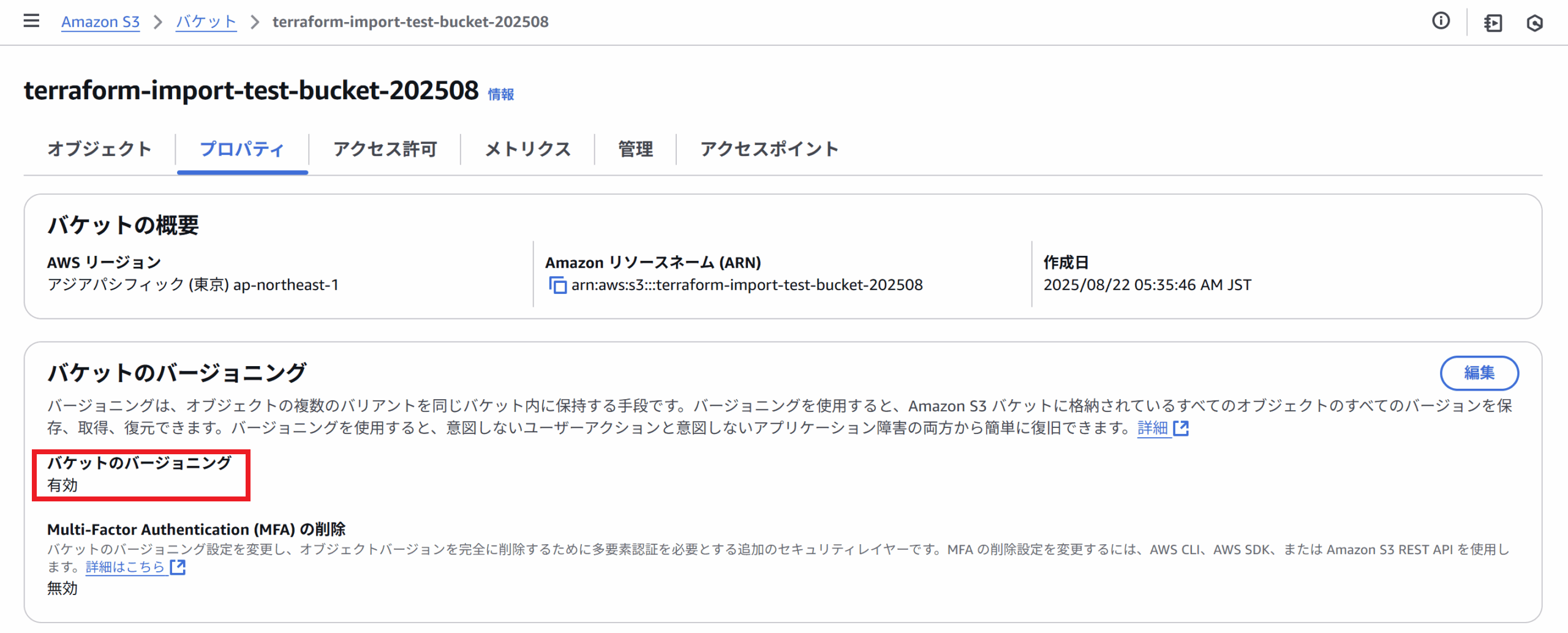
コンソール画面上でも、バージョニングが有効になったことがわかります。
おわりに
今回は、手動作成したリソースをインポートしてTerraformの管理下に置き、Terraformで設定を更新するところまで実施してみました。
組織によっては、手動構築したリソースをTerraformで管理していきたいと考えているところも多いかと思います。インポートを使いこなせると、どんどんIaC化を進めることができるので、積極的に活用していきたいですね!

関連記事
-
 AWS構築をCI/CDパイプラインで自動化する(Terraform)
-
 SpringBoot × Kotlin × Lambda × Terraform × OpenAPI で API を構築してみた
-
 API GatewayのOpenAPIインポートとTerraformのテンプレートでいい感じにAPI管理する