
手動作成したリソースをcdk importして、ついでにcdk-nagでセキュリティスキャンしてみた
目次
はじめに
こんにちは、CloudBuildersのsugawaraです。
これまでCDKで新規構築は行ってきたましたが、既存リソースの取り込み(cdk import)や、セキュリティのベストプラクティスチェック(cdk-nag)にはあまり触れてきませんでした。今回は、それらを一通り試しておきたいと思い、まとめて検証してみました。
それぞれの概要
cdk importってなに?
cdk importは、既存のAWSリソースをCloudFormationスタックの管理下に取り込み、CDKで管理できるようにするためのコマンドです。手動で作成されたリソースやCloudFormation外で作られたリソースも、CDKのコードに取り込むことによって、変更管理や差分の確認(cdk diff)ができるようになります。
cdk-nagってなに?
cdk-nag は、CDKで定義したインフラリソースに対して、セキュリティのベストプラクティスに基づく自動チェックを行うライブラリです。 CDKのコードにアスペクト(Aspect)として追加することで、各AWSリソースにルールベースで検証され、準拠・非準拠の設定を検出・可視化することができます。
検証の流れ
検証環境
$ npx cdk --version
2.1003.0 (build b242c23)
$ node --version
v22.14.0
インポートしてみる
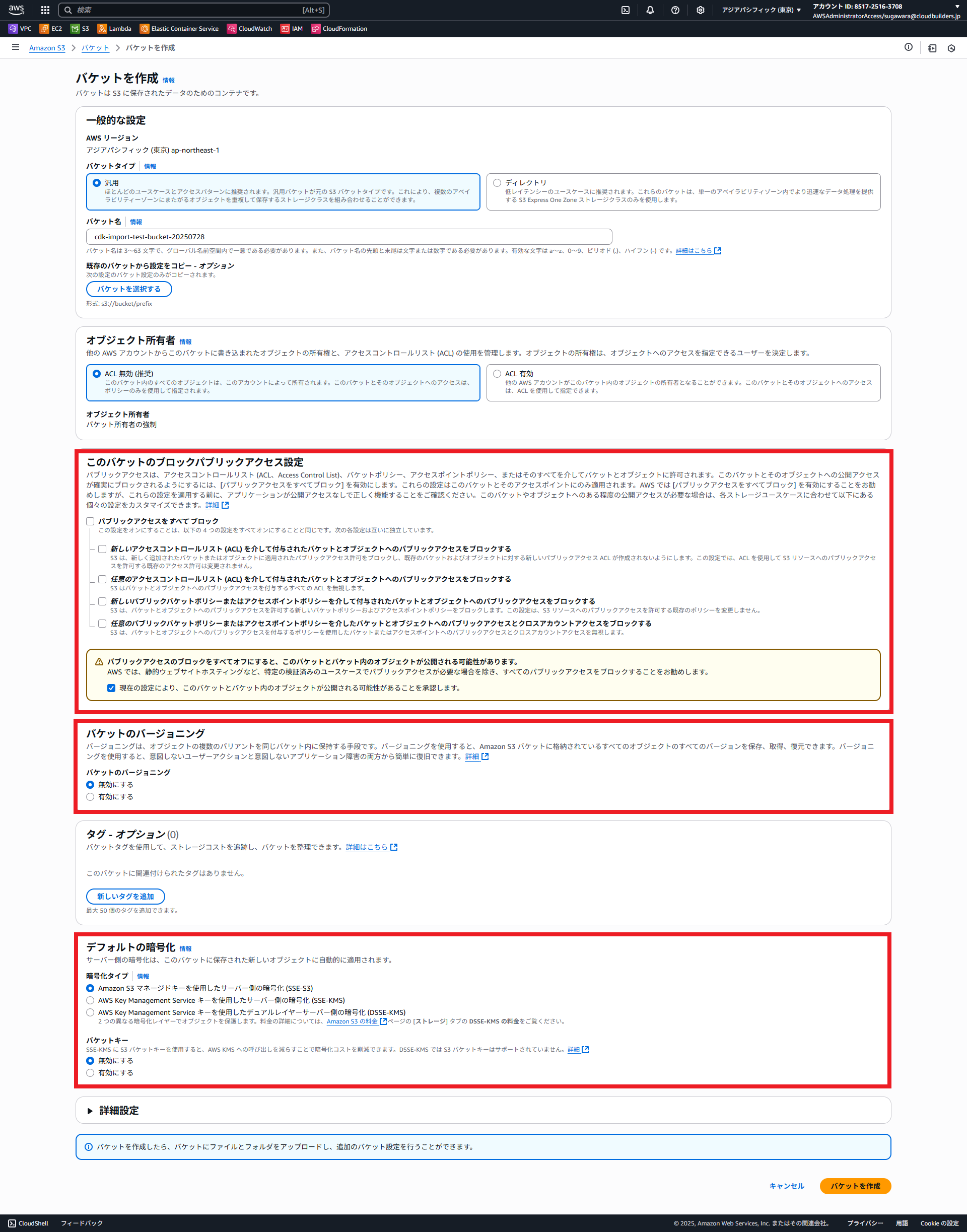
まずは手動でS3バケットを作成します。今回はcdk import後の更新や、cdk-nagでセキュリティチェックをするため、バージョニングやブロックパブリックアクセスは無効にしています。
次に、任意のディレクトリでCDKスタックを作成します。
$ mkdir cdk-import-test
$ cd cdk-import-test
$ cdk init app --language=typescript
bin配下のcdk-import-test.tsにデプロイするアカウントを指定しておきます。後ほどこのファイルはcdk-nagのために更新します。
#!/usr/bin/env node
import * as cdk from "aws-cdk-lib";
import { CdkImportTestStack } from "../lib/cdk-import-test-stack";

const app = new cdk.App();
new CdkImportTestStack(app, "CdkImportTestStack", {
  env: { account: "XXXXXXXXXXXX", region: "ap-northeast-1" },
});
lib配下のcdk-import-test.tsでは、一旦リソース定義は行わずに下記のみ記載します。
import * as cdk from "aws-cdk-lib";
import { Construct } from "constructs";

export class CdkImportTestStack extends cdk.Stack {
  constructor(scope: Construct, id: string, props?: cdk.StackProps) {
    super(scope, id, props);
  }
}
そのまま空のスタックをデプロイします。
$ npx cdk deploy

✨  Synthesis time: 4.42s

CdkImportTestStack: start: Building c2d924ec800d4be6ceb3e3350240bc70bf5da7de193335b9ff91264d43042738
CdkImportTestStack: success: Built c2d924ec800d4be6ceb3e3350240bc70bf5da7de193335b9ff91264d43042738
CdkImportTestStack: start: Publishing c2d924ec800d4be6ceb3e3350240bc70bf5da7de193335b9ff91264d43042738:XXXXXXXXXXXX-ap-northeast-1
CdkImportTestStack: success: Published c2d924ec800d4be6ceb3e3350240bc70bf5da7de193335b9ff91264d43042738:XXXXXXXXXXXX-ap-northeast-1
CdkImportTestStack: deploying... [1/1]
CdkImportTestStack: creating CloudFormation changeset...

 ✅  CdkImportTestStack

✨  Deployment time: 13.8s

Stack ARN:
arn:aws:cloudformation:ap-northeast-1:XXXXXXXXXXXX:stack/CdkImportTestStack/55c45750-6a64-11f0-9535-0e665f448135

✨  Total time: 18.21s
CloudFormationコンソールで確認すると、CdkImportTestStackが作成されています。リソースはMetadataのみです。

取り込みたいS3バケットの名前を指定してリソース定義を記述します。
import * as cdk from "aws-cdk-lib";
import { Construct } from "constructs";
import * as s3 from "aws-cdk-lib/aws-s3";

export class CdkImportTestStack extends cdk.Stack {
  constructor(scope: Construct, id: string, props?: cdk.StackProps) {
    super(scope, id, props);
    // ここから追加
    new s3.Bucket(this, "S3Bucket", {
      bucketName: "cdk-import-test-bucket-20250728",
    });
  }
}
差分確認用にcdk diffコマンドを実行すると、S3バケットの差分が表示されます。
$ npx cdk diff
start: Building 2e82dca484900323be6a2242bb0b01860e12492d8055fdbd39fce3b44be73382
success: Built 2e82dca484900323be6a2242bb0b01860e12492d8055fdbd39fce3b44be73382
start: Publishing 2e82dca484900323be6a2242bb0b01860e12492d8055fdbd39fce3b44be73382:XXXXXXXXXXXX-ap-northeast-1
success: Published 2e82dca484900323be6a2242bb0b01860e12492d8055fdbd39fce3b44be73382:XXXXXXXXXXXX-ap-northeast-1
Hold on while we create a read-only change set to get a diff with accurate replacement information (use --no-change-set to use a less accurate but faster template-only diff)
Stack CdkImportTestStack
Resources
[+] AWS::S3::Bucket S3Bucket S3Bucket07682993


✨  Number of stacks with differences: 1
cdk importを実行すると、指定したS3バケットをインポートしてよいか聞かれますので、yesを選択します。
$ npx cdk import
CdkImportTestStack
start: Building 481fe2a854641d39a7192b2f371a6e4596638f9b20aaec365306d1922e626068
success: Built 481fe2a854641d39a7192b2f371a6e4596638f9b20aaec365306d1922e626068
start: Publishing 481fe2a854641d39a7192b2f371a6e4596638f9b20aaec365306d1922e626068:XXXXXXXXXXXX-ap-northeast-1
success: Published 481fe2a854641d39a7192b2f371a6e4596638f9b20aaec365306d1922e626068:XXXXXXXXXXXX-ap-northeast-1
CdkImportTestStack/S3Bucket/Resource (AWS::S3::Bucket): import with BucketName=cdk-import-test-bucket-20250728 (yes/no) [default: yes]?
CdkImportTestStack: importing resources into stack...
CdkImportTestStack: creating CloudFormation changeset...

 ✅  CdkImportTestStack
Import operation complete. We recommend you run a drift detection operation to confirm your CDK app resource definitions are up-to-date. Read more here: https://docs.aws.amazon.com/AWSCloudFormation/latest/UserGuide/detect-drift-stack.html
CloudFormationコンソールを確認すると、ステータスがIMPORT_COMPLETEになっており、リソースにはS3バケットが追加されてます。
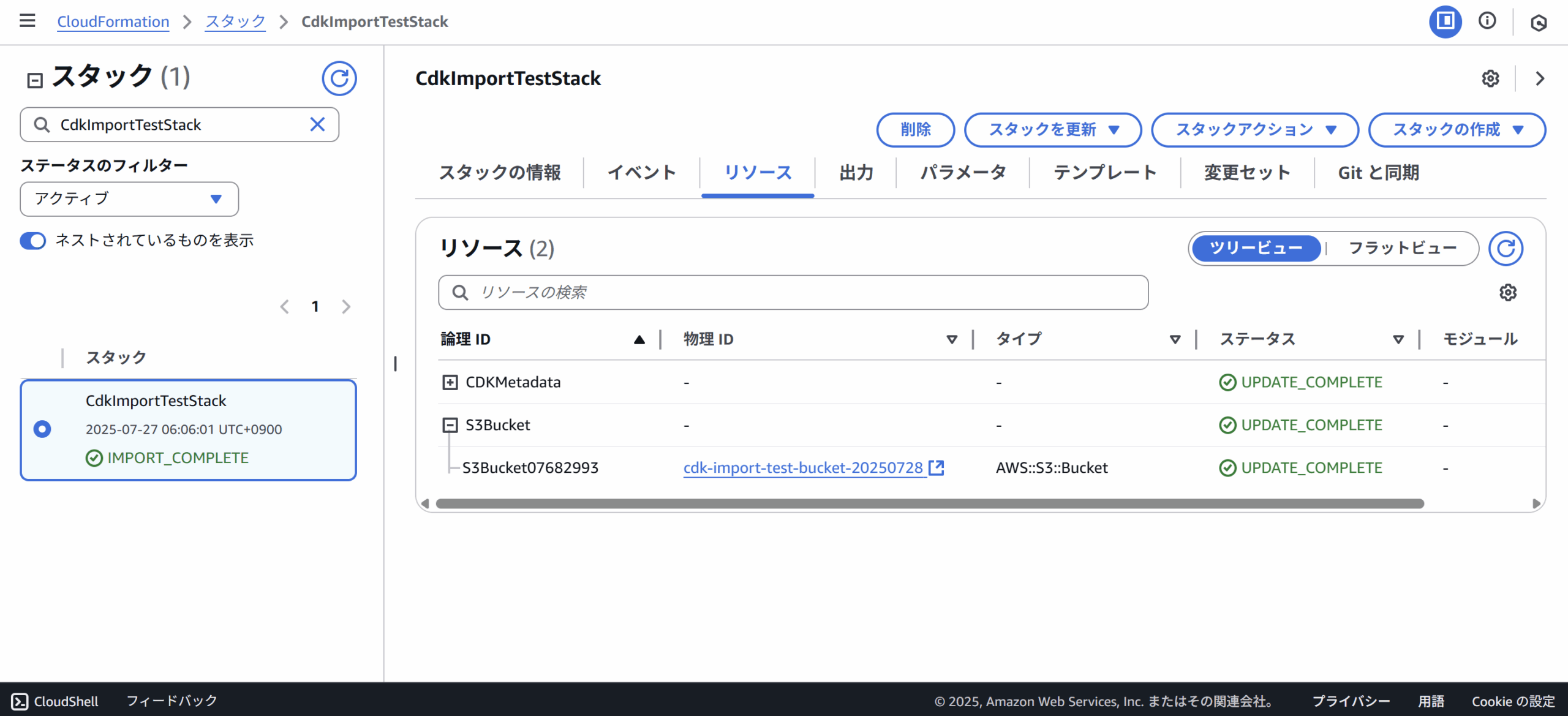
スタックにS3バケットが問題なく追加されました。ただし、CDKのコードにはbucketnameのみ指定しており、実際のリソースの設定とは乖離があります。
最初に提示したように、手動構築したS3バケットにはバージョニングもブロックパブリックアクセスも無効になっているはずです。CloudFormationの管理下にあるとはいえ、設定がコードに反映されていない場合、
一旦バージョニングを有効にしてcdk diffを実行します。本当にバージョニングが無効の設定でimportされていれば、差分[+]が表示されます。
import * as cdk from "aws-cdk-lib";
import { Construct } from "constructs";
import * as s3 from "aws-cdk-lib/aws-s3";

export class CdkImportTestStack extends cdk.Stack {
  constructor(scope: Construct, id: string, props?: cdk.StackProps) {
    super(scope, id, props);

    new s3.Bucket(this, "S3Bucket", {
      bucketName: "cdk-import-test-bucket-20250728",
      versioned: true, // 手動構築はfalseになっている
  }
}
cdk diffの結果、バージョニングが有効化される差分が表示されました。インポートされたS3バケットは想定通りの設定のようです。
$ npx cdk diff
start: Building 5f33cf6b37887808e5441caa583f13e2a06831371f5787940d750a244cb9de38
success: Built 5f33cf6b37887808e5441caa583f13e2a06831371f5787940d750a244cb9de38
start: Publishing 5f33cf6b37887808e5441caa583f13e2a06831371f5787940d750a244cb9de38:XXXXXXXXXXXX-ap-northeast-1
success: Published 5f33cf6b37887808e5441caa583f13e2a06831371f5787940d750a244cb9de38:XXXXXXXXXXXX-ap-northeast-1
Hold on while we create a read-only change set to get a diff with accurate replacement information (use --no-change-set to use a less accurate but faster template-only diff)
Stack CdkImportTestStack
Resources
[~] AWS::S3::Bucket S3Bucket S3Bucket07682993
 └─ [+] VersioningConfiguration
     └─ {"Status":"Enabled"}


✨  Number of stacks with differences: 1
cdk deployを実行して、このままインポートしたS3バケットのバージョニングを有効化します。
$ npx cdk deploy

✨  Synthesis time: 4.56s

CdkImportTestStack: deploying... [1/1]
CdkImportTestStack: creating CloudFormation changeset...

 ✅  CdkImportTestStack

✨  Deployment time: 44.82s

Stack ARN:
arn:aws:cloudformation:ap-northeast-1:XXXXXXXXXXXX:stack/CdkImportTestStack/55c45750-6a64-11f0-9535-0e665f448135

✨  Total time: 49.38s
S3バケットの設定を見ると、バージョニングが有効化されたのがわかります。
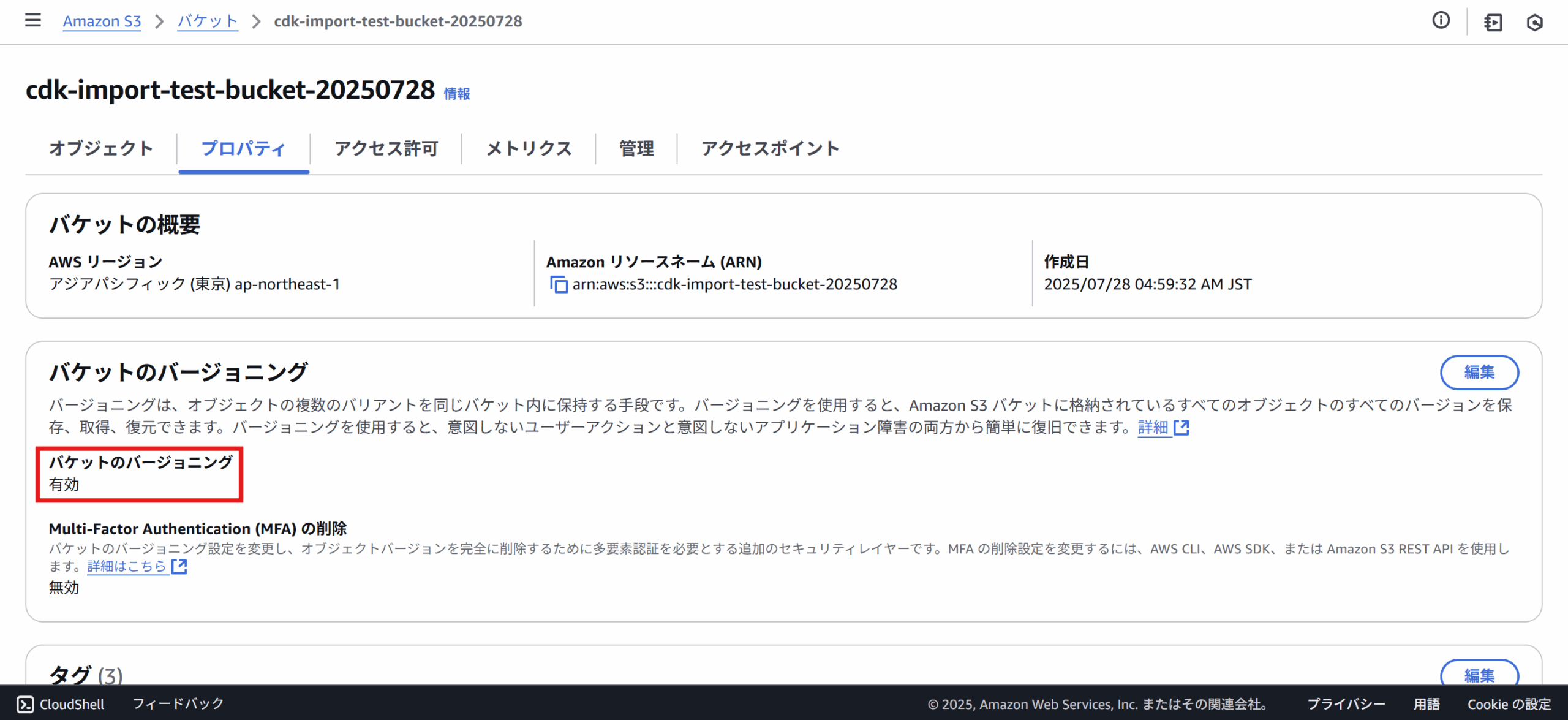
このように、cdk importは既存の手動構築したリソースの存在をCDKの管理下に組み込むものです。したがって、リソースの設定値などの状態までは自動的には反映されません。コードと実際の設定の差分は手動で埋める必要があるようです。
※IaC Generatorとcdk migrateを利用すれば、このような作業はなくなるようですが、CDKコードはL1になるようです。
セキュリティチェックをしてみる
次はインポートして更新したS3バケットに対してセキュリティチェックを実行します。まず、cdk-nagをインストールします。
$ npm install cdk-nagbin配下のcdk-import-test.tsを下記のよう修正します。cdk-nagで利用できるルールが5つありますが、今回はもっとも一般的と思われるAWS Solutionsというものを選択します。
#!/usr/bin/env node
import * as cdk from "aws-cdk-lib";
import { CdkImportTestStack } from "../lib/cdk-import-test-stack";
import { AwsSolutionsChecks } from "cdk-nag"; // 追加
import { Aspects } from "aws-cdk-lib";  // 追加

const app = new cdk.App();
Aspects.of(app).add(new AwsSolutionsChecks({ verbose: true })); // 追加
new CdkImportTestStack(app, "CdkImportTestStack", {
  env: { account: "XXXXXXXXXXXX", region: "ap-northeast-1" },
});
lib配下のcdk-import-test-stack.tsには、明示的にブロックパブリックアクセスが無効になるように追加しておきます。
※cdk-nagはcdk synthの出力結果を解析するため、記載がない場合は正しくスキャンしてくれないようです。
import * as cdk from "aws-cdk-lib";
import { Construct } from "constructs";
import * as s3 from "aws-cdk-lib/aws-s3";

export class CdkImportTestStack extends cdk.Stack {
  constructor(scope: Construct, id: string, props?: cdk.StackProps) {
    super(scope, id, props);

    new s3.Bucket(this, "S3Bucket", {
      bucketName: "cdk-import-test-bucket-20250728",
      versioned: true,
      blockPublicAccess: new s3.BlockPublicAccess({  // 検証のため追加
        blockPublicAcls: false,
        ignorePublicAcls: false,
        blockPublicPolicy: false,
        restrictPublicBuckets: false,
      }),
    });
  }
}
この状態で、cdk synthコマンドを実行すると、下記のようなエラー出力となります。それぞれサーバーアクセスログ、ブロックパブリックアクセスとSSLの設定に問題があるとのことです。
$ npx cdk synth
[Error at /CdkImportTestStack/S3Bucket/Resource] AwsSolutions-S1: The S3 Bucket has server access logs disabled. The bucket should have server access logging enabled to provide detailed records for the requests that are made to the bucket.

[Error at /CdkImportTestStack/S3Bucket/Resource] AwsSolutions-S2: The S3 Bucket does not have public access restricted and blocked. The bucket should have public access restricted and blocked to prevent unauthorized access.

[Error at /CdkImportTestStack/S3Bucket/Resource] AwsSolutions-S10: The S3 Bucket or bucket policy does not require requests to use SSL. You can use HTTPS (TLS) to help prevent potential attackers from eavesdropping on or manipulating network traffic using person-in-the-middle or similar attacks. You should allow only encrypted connections over HTTPS (TLS) using the aws:SecureTransport condition on Amazon S3 bucket policies.

Found errors
cdk.outにスキャン結果がcsv形式で出力されています。S3バケットに関するルールは下記の4つのようです。No-Compliantは、ルールに準拠せずにエラーとして出力されたもの。一方、Compliantはルールに準拠しており、OK であったものです。各ルールの詳細についてはこちらをご参照ください。
Rule ID,Resource ID,Compliance,Exception Reason,Rule Level,Rule Info
"AwsSolutions-S1","CdkImportTestStack/S3Bucket/Resource","Non-Compliant","N/A","Error","The S3 Bucket has server access logs disabled."
"AwsSolutions-S2","CdkImportTestStack/S3Bucket/Resource","Non-Compliant","N/A","Error","The S3 Bucket does not have public access restricted and blocked."
"AwsSolutions-S5","CdkImportTestStack/S3Bucket/Resource","Compliant","N/A","Error","The S3 static website bucket either has an open world bucket policy or does not use a CloudFront Origin Access Identity (OAI) in the bucket policy for limited getObject and/or putObject permissions."
"AwsSolutions-S10","CdkImportTestStack/S3Bucket/Resource","Non-Compliant","N/A","Error","The S3 Bucket or bucket policy does not require requests to use SSL."
一旦すべてをCompliantの状態にしたいので、下記のように修正します。すると、問題なくcdk synthが通るようになります。
import * as cdk from "aws-cdk-lib";
import { Construct } from "constructs";
import * as s3 from "aws-cdk-lib/aws-s3";

export class CdkImportTestStack extends cdk.Stack {
  constructor(scope: Construct, id: string, props?: cdk.StackProps) {
    super(scope, id, props);

    new s3.Bucket(this, "S3Bucket", {
      bucketName: "cdk-import-test-bucket-20250728",
      versioned: true,
      serverAccessLogsPrefix: "log/", // 追加
      blockPublicAccess: s3.BlockPublicAccess.BLOCK_ALL, // 追加
      enforceSSL: true, // 追加
    });
  }
}
このコードでcdk synthを実行すると、すべてCompliantになってCloudFormationテンプレートが出力されます。
Rule ID,Resource ID,Compliance,Exception Reason,Rule Level,Rule Info
"AwsSolutions-S1","CdkImportTestStack/S3Bucket/Resource","Compliant","N/A","Error","The S3 Bucket has server access logs disabled."
"AwsSolutions-S2","CdkImportTestStack/S3Bucket/Resource","Compliant","N/A","Error","The S3 Bucket does not have public access restricted and blocked."
"AwsSolutions-S5","CdkImportTestStack/S3Bucket/Resource","Compliant","N/A","Error","The S3 static website bucket either has an open world bucket policy or does not use a CloudFront Origin Access Identity (OAI) in the bucket policy for limited getObject and/or putObject permissions."
"AwsSolutions-S10","CdkImportTestStack/S3Bucket/Resource","Compliant","N/A","Error","The S3 Bucket or bucket policy does not require requests to use SSL."
"AwsSolutions-S10","CdkImportTestStack/S3Bucket/Policy/Resource","Compliant","N/A","Error","The S3 Bucket or bucket policy does not require requests to use SSL."
ルールが準拠・非準拠でなくても、抑制することも可能です。つまり、ルールに準拠していないとしても、特に問題ではない場合です。このときに利用するのがサプレッション(Suppression)です。
実際にルールIDがAwsSolutions-S1のサーバーログに関するルールをサプレスしてみます。さきほどcdk synthが通ったコードのサーバーログの記述をコメントアウトしてみます。
import * as cdk from "aws-cdk-lib";
import { Construct } from "constructs";
import * as s3 from "aws-cdk-lib/aws-s3";

export class CdkImportTestStack extends cdk.Stack {
  constructor(scope: Construct, id: string, props?: cdk.StackProps) {
    super(scope, id, props);

    new s3.Bucket(this, "S3Bucket", {
      bucketName: "cdk-import-test-bucket-20250728",
      versioned: true,
      // serverAccessLogsPrefix: "log/", // ここをコメントアウトする
      blockPublicAccess: s3.BlockPublicAccess.BLOCK_ALL,
      enforceSSL: true,
    });
  }
}
この状態でcdk synthすると、当然サーバーログに関するAwsSolutions-S1だけNon-Compliantになります。これをサプレスしていきます。
Rule ID,Resource ID,Compliance,Exception Reason,Rule Level,Rule Info
"AwsSolutions-S1","CdkImportTestStack/S3Bucket/Resource","Non-Compliant","N/A","Error","The S3 Bucket has server access logs disabled."
"AwsSolutions-S2","CdkImportTestStack/S3Bucket/Resource","Compliant","N/A","Error","The S3 Bucket does not have public access restricted and blocked."
"AwsSolutions-S5","CdkImportTestStack/S3Bucket/Resource","Compliant","N/A","Error","The S3 static website bucket either has an open world bucket policy or does not use a CloudFront Origin Access Identity (OAI) in the bucket policy for limited getObject and/or putObject permissions."
"AwsSolutions-S10","CdkImportTestStack/S3Bucket/Resource","Compliant","N/A","Error","The S3 Bucket or bucket policy does not require requests to use SSL."
"AwsSolutions-S10","CdkImportTestStack/S3Bucket/Policy/Resource","Compliant","N/A","Error","The S3 Bucket or bucket policy does not require requests to use SSL."サプレッションのやり方にはいくつかありますが、今回はシンプルな方法で実装していきます。※詳しくは、こちらをご参照ください。
S3バケットの下にサプレッションの記述をしていきます。
import * as cdk from "aws-cdk-lib";
import { Construct } from "constructs";
import * as s3 from "aws-cdk-lib/aws-s3";
import { NagSuppressions } from "cdk-nag"; // 追加

export class CdkImportTestStack extends cdk.Stack {
  constructor(scope: Construct, id: string, props?: cdk.StackProps) {
    super(scope, id, props);

    new s3.Bucket(this, "S3Bucket", {
      bucketName: "cdk-import-test-bucket-20250728",
      versioned: true,
      // serverAccessLogsPrefix: "log/", コメントアウトのまま
      blockPublicAccess: s3.BlockPublicAccess.BLOCK_ALL,
      enforceSSL: true,
    });
    NagSuppressions.addStackSuppressions(this, [  // 追加
      {
        id: "AwsSolutions-S1", // サプレスしたいRule ID
        reason: "Test bucket. Access logs not needed.", // サプレスしたい理由
      },
    ]);
  }
}
この状態でcdk synthを実行すると、AwsSolutions-S1がSuppressedになり、サプレスしたい理由が追加されています。
Rule ID,Resource ID,Compliance,Exception Reason,Rule Level,Rule Info
"AwsSolutions-S1","CdkImportTestStack/S3Bucket/Resource","Suppressed","Test bucket. Access logs not needed.","Error","The S3 Bucket has server access logs disabled."
"AwsSolutions-S2","CdkImportTestStack/S3Bucket/Resource","Compliant","N/A","Error","The S3 Bucket does not have public access restricted and blocked."
"AwsSolutions-S5","CdkImportTestStack/S3Bucket/Resource","Compliant","N/A","Error","The S3 static website bucket either has an open world bucket policy or does not use a CloudFront Origin Access Identity (OAI) in the bucket policy for limited getObject and/or putObject permissions."
"AwsSolutions-S10","CdkImportTestStack/S3Bucket/Resource","Compliant","N/A","Error","The S3 Bucket or bucket policy does not require requests to use SSL."
"AwsSolutions-S10","CdkImportTestStack/S3Bucket/Policy/Resource","Compliant","N/A","Error","The S3 Bucket or bucket policy does not require requests to use SSL."
これでインポートしたS3バケットをセキュリティスキャンした上でcdk deployすることができる状態になりました!
おわりに
今回は、手動作成したリソースをcdk importでCloudFormation管理下に置き、CDKによるリソースの設定変更や、cdk-nagによるセキュリティチェックを行いました。
ここ最近はずっと案件でCDKを触っていたのですが、こういった機能やツールはあまり使ってこなかったので、とても新鮮でした!
今後は一旦CDKからは離れて、Terraformに再入門していきたい!!

関連記事
-
 【AWS CDK】LambdaをTypeScriptで書きたい
-
 【AWS CDK】AWS Client VPN + AWS SSO + AWS WAFでCloudFrontへのアクセスを制御する
-
 AWS CDK + ecspresso + CodeDeployを使用してECSをデプロイする